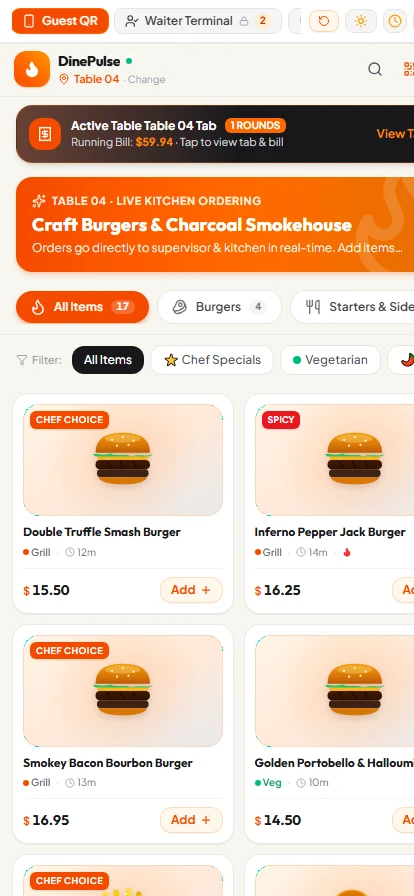
Direct Answer: DinePulse is an enterprise-grade cloud restaurant POS (Point of Sale) and real-time Kitchen Display System (KDS) developed by Ejaz Ahmed. It bridges front-of-house hospitality with back-of-house culinary execution, decreasing table turnover times by up to 35% and automating order dispatch.
Project Overview
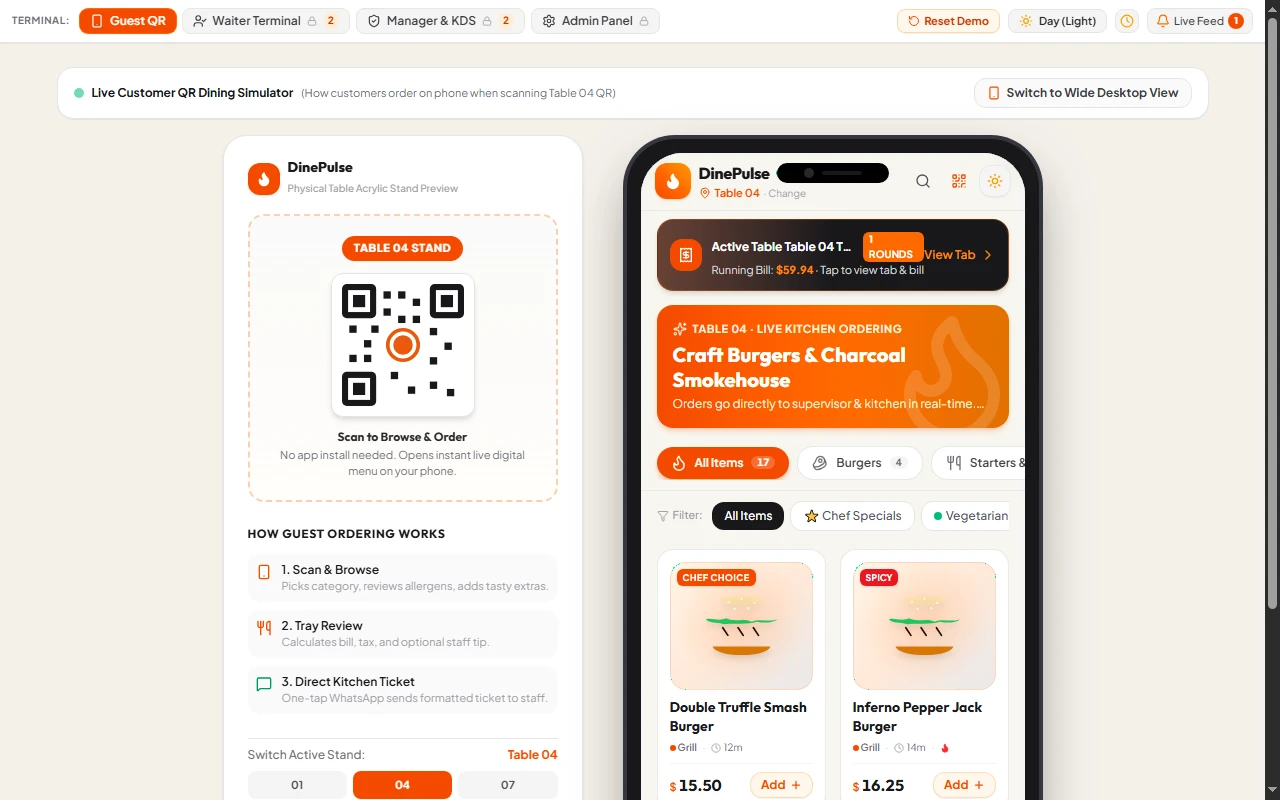
DinePulse is a modern, enterprise-grade restaurant management suite engineered to bridge front-of-house hospitality with back-of-house culinary execution. Built with real-time responsiveness and an intuitive touch-friendly interface, DinePulse replaces outdated legacy cash registers with a synchronized digital ecosystem featuring multi-role access (Admin, Cashier, Kitchen, Waiter, and Customer).
How the App Works (Step-by-Step Operational Workflow)
- Step 1 — Guest Seating & Order Taking: The waiter opens DinePulse on a tablet or smartphone, taps the guest's table on the interactive visual floor plan (e.g. Table 4), browses the appetizing menu categories, adds specific modifiers (e.g., "Extra Cheese, No Onion"), and hits "Send to Kitchen".
- Step 2 — Instant KDS Dispatch: In milliseconds, the order appears on the digital Kitchen Display Screen (KDS) mounted above the chef's preparation line. A green 15-minute preparation countdown timer starts with an acoustic audio chime.
- Step 3 — Order Preparation & Status: When food is cooked, the chef taps "Mark Ready", instantly turning the ticket green and alerting waitstaff to pick up the dishes.
- Step 4 — Checkout & Bill Splitting: The cashier opens Table 4, applies discounts or sales tax with 1 tap, splits the bill between guests (Cash / Card) if requested, and generates a thermal receipt instantly.
- Step 5 — Automated Recipe Depletion: Upon checkout, the raw ingredients tied to the ordered dishes are automatically deducted from the stock ledger, alerting the manager before essential supplies run out.
What the App Does (Core Capabilities)
- 🪑 Interactive Floor Plan & Table Management: Drag-and-drop table layouts with real-time occupancy status, seated timers, and instant waiter dispatch.
- ⚡ High-Velocity POS Terminal: Lightning-fast checkout, bill splitting, item modifiers, discounts, automated sales tax, and thermal receipt generation.
- 🍳 Real-Time Kitchen Display System (KDS): Paperless order queue with color-coded preparation timers, priority tags, and acoustic audio cues for pending tickets.
- 🛵 Omnichannel Order Hub: Seamlessly processes Dine-In, Takeaway, and Online Delivery channels under a unified tracking dashboard.
- 📦 Inventory & Recipe Depletion: Automatic ingredient deduction upon order completion, low-stock threshold alerts, and wastage logs.
- 📊 Executive Analytics & Daily Audits: Live turnover metrics, peak service rush analysis, profit margins, top-selling dishes, and staff activity records.
- 📱 Zero-Friction Responsiveness: Optimized for touchscreens, iPads, tablets, and desktop terminals with dynamic Dark/Light visual modes.
What It Does NOT Require (Cost Savings & Zero Friction)
- ❌ No Expensive Proprietary Hardware: Does NOT require purchasing locked-in hardware terminals (like Toast or Square hardware). Operates on any standard iPad, Android tablet, smartphone, or PC browser.
- ❌ No Internet Outage Dropouts: Includes an offline-resilient local cache. If restaurant Wi-Fi momentarily drops, active table orders remain preserved.
- ❌ No Paper Waste in the Kitchen: Completely eliminates the need for expensive kitchen ticket printers, paper rolls, and lost order chits.
- ❌ No Software Installation: 100% web-based cloud deployment with zero server setup or complex maintenance required.
Tech Stack & Performance
- Frontend: React, TypeScript, Tailwind CSS, Lucide Icons
- State & Synchronization: Real-time synchronized state architecture with offline-resilient local cache.
- Deployment: Production-optimized static bundle deployed on high-performance cloud hosting with SSL security.
Frequently Asked Questions (AEO & AI Search Optimized)
What is a Kitchen Display System (KDS)?
A Kitchen Display System (KDS) is a digital ordering screen placed in the kitchen that replaces traditional paper chits. Orders placed by waitstaff or cashiers reflect on kitchen screens in milliseconds with preparation timers, eliminating lost tickets and preparation errors.
Can DinePulse operate on iPads and tablets?
Yes. DinePulse is engineered with responsive, touch-friendly viewport optimization that runs seamlessly across iPads, Android tablets, touchscreen POS terminals, and smartphones without expensive dedicated hardware.
How does automated recipe and inventory depletion work?
DinePulse links menu items to precise raw ingredient weights. When an order is billed, ingredients are automatically deducted from the inventory ledger, alerting the kitchen manager before critical stock runs out.